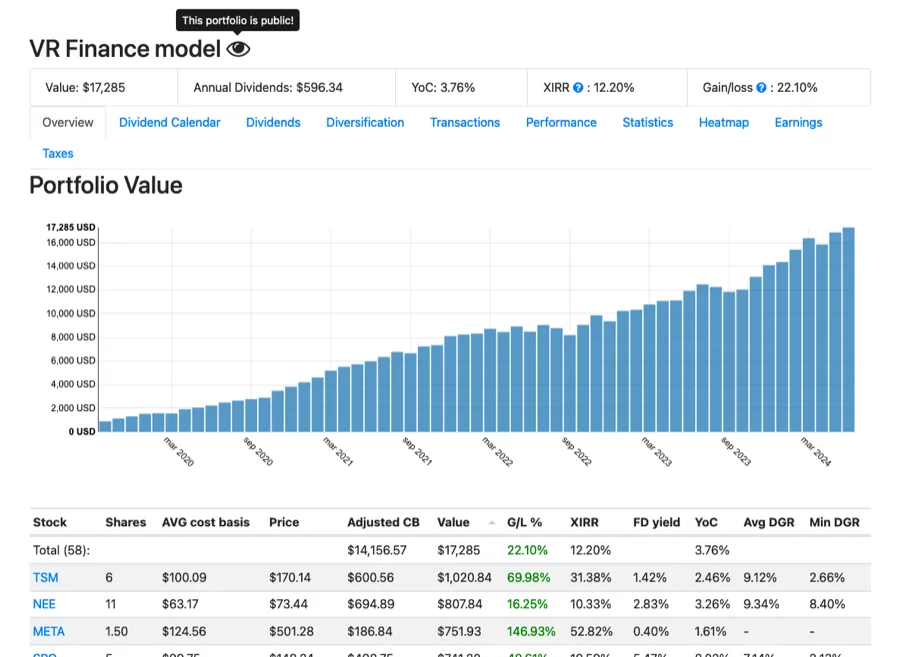
Digrin is a dividend portfolio tracker created by a dividend investor (active since 2014) who got tired of maintaining sprawling payout spreadsheets. The product pulls upcoming and historical dividend information into one dashboard so you can see when cash should land, what yield-on-cost looks like, how dividend growth is trending, what rough tax drag might be, and how the portfolio performs against a benchmark.
Getting data in is flexible. Add transactions manually to test the app, import CSV from a long list of brokers (Fidelity, Interactive Brokers, Robinhood, Trading212, Degiro, Revolut, eToro, Saxo, and many more, plus AI-assisted “any format” CSV help), or connect Trading212 and Interactive Brokers for automatic sync. Free users get daily sync; paid members get on-demand sync as frequently as every five minutes.
Here is what you actually get, and what code DIGRIN20 changes at checkout.
1. Dividend calendar
Dividend calendar includes paid, announced, and projected dividends with month-by-month income planning.
2. Yield and growth analytics
Yield and growth analytics include yield on cost, DGR, XIRR, and projected dividend income.
3. Benchmark comparisons
Benchmark comparisons include performance versus SPY/S&P context, with custom benchmarks on paid plans.
4. Tax estimates
Dividends and capital gains views by currency and holding for planning (coverage expands on paid tiers).
5. Broker sync
Trading212 and Interactive Brokers, daily on free and on-demand on paid.
6. CSV import ecosystem
CSV import ecosystem includes wide broker support plus AI-assisted CSV import with plan-based daily limits.
7. Dividend screener & watcher
Dividend screener & watcher lets you find and monitor income ideas by yield, growth, payout, and sector.
Check it out here: Digrin
8. Heatmaps and deeper statistics
Heatmaps and deeper statistics unlock more history as you move from Explorer to Plus/Pro.
9. What it costs
Save 20% on Digrin with code DIGRIN20 via our partner link.
From Digrin’s pricing page (priced in EUR; confirm live):
Paid plans advertise cancel-anytime billing and a money-back guarantee. Annual billing is materially cheaper than monthly.
Save 20% on Digrin with code DIGRIN20 via our partner link. Use the partner link on this page, apply any listed code at checkout if one is required, and confirm the final cart total on the vendor site before you pay — list prices and promotions can change.
Prices move. The number on their checkout page is the one that counts.
- Copy DIGRIN20.
- Open Digrin from this page, so the visit is tied to the offer.
- Paste DIGRIN20 at checkout and confirm the total.
Check it out here: Digrin pricing
Who it's for
Digrin is for dividend and total-return investors who hold stocks/ETFs across one or more brokers and want income visibility without spreadsheet maintenance. It especially helps accumulators who reinvest, track yield on cost, and care about next quarter’s cash calendar.
It is not a day-trading scanner, options flow terminal, or tax-filing product. Active traders who never hold through ex-div will probably underuse it.
- Native automatic sync is highlighted for Trading212 and Interactive Brokers; many other brokers still require CSV or manual entry. Free-tier caps on portfolios, monthly transactions, and calendar horizon are real limits once you trade often or run multiple accounts. Tax figures are estimates for planning — not CPA-ready filings. Corporate actions, FX conversion, and odd lot edge cases can still need manual cleanup. Always verify large discrepancies against broker statements.
Thank you for reading.
— SaveOnTrading
P.S. The code is DIGRIN20. It is 20% off. Confirm the live total at checkout. Open Digrin.
/ FAQ
Common questions about Digrin
6 questions